Overview
Description
SchemaRefinery is a comprehensive toolkit designed for refining and managing MLST schemas. It provides a suite of modules for various tasks such as selecting and downloading genome assemblies, identifying paralogous and spurious loci, annotating schema loci and adapting loci into standardized schemas.
This toolkit is suited for managing and processing schemas created using chewBBACA or other tools. By providing features to annotate and refine schemas, Schema Refinery aids users in improving the quality of schemas and exploring the gene diversity contained in the schemas.
Modules
Schema Refinery includes the following modules:
IdentifyParalogousLoci: Identifies paralogous loci in a schema.
IdentifySpuriousGenes: Identifies spurious loci in a schema.
SchemaAnnotation: Annotates schema loci based on multiple sources.
MatchSchemas: Matches two schemas to find shared loci.
DownloadAssemblies: Downloads genome assemblies from multiple databases.
AdaptLoci: Creates a schema from loci in fasta format.
ApplyRecommendations: Refine a schema based on a set of recommendations.
Modules Usage
Each module can be used independently by running the corresponding script with the required command-line arguments. Below are the links to the documentation page for each module, which includes detailed usage instructions and examples, and the command to display the help message for each module:
IdentifyParalogousLoci documentation
SR IdentifyParalogousLoci --help
IdentifySpuriousGenes documentation
SR IdentifySpuriousGenes --help
SchemaAnnotation documentation
SR SchemaAnnotation --help
SR MatchSchemas --help
DownloadAssemblies documentation
SR DownloadAssemblies --help
SR AdaptLoci --help
ApplyRecommendations documentation
SR ApplyRecommendations --help
Schema Creation Workflow
Workflow for creating a schema using SchemaRefinery and chewBBACA:
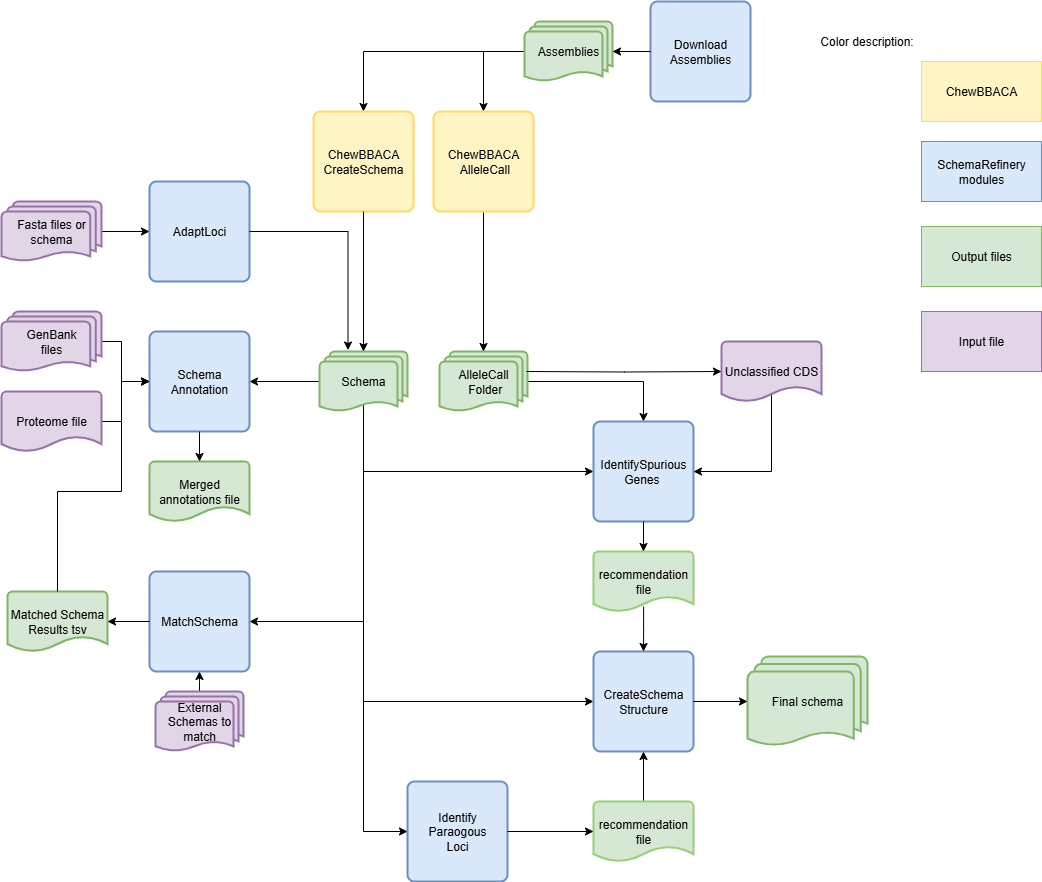
SchemaRefinery does not have a specific sequence in which the modules must be used. The starting and ending points will depend on the objectives of the user. However, it is recommended to run the AdaptLoci module as the first step if the starting schema is not compatible with chewBBACA’s latest version as the tool works with the chewBBACA schema structure.
The modules can be used almost completely without a specific order. In the case of the SchemaAnnotation module with the match-schemas mode, the MatchSchemas module has to be run before. For the ApplyRecommendations module, the input file has to be the output of either the IdentifyParalogousLoci or the IdentifySpuriousGenes modules.
Use Cases
Comparing an older version of a schema with its latest version:
In this case we want to compare and old and new version of the same schema to better understand the changes done. We will annotate it using information from the old schema to better understand what information was mantained.
Use the AdaptLoci module to validate the schemas’ structure (you can skip this step if the schemas are already in a format compatible with chewBBACA):
SR AdaptLoci -i path/to/old_schema -o path/to/old_schema_formatted -c 4
SR AdaptLoci -i path/to/new_schema -o path/to/new_schema_formatted -c 4
Important
If there are any recommended changes to be done to the names, take them into consideration and change these loci names to avoid errors down the line.
Match the schemas using the MatchSchema module:
SR MatchSchema -fs path/to/old_schema_formatted -ss path/to/new_schema_formatted -o path/to/MatchSchema_output -c 6
Annotate the old schema with the SchemaAnnotation module by comparing the schema loci against a list of UniProt proteomes:
SR SchemaAnnotation -s path/to/old_schema_formatted -o path/to/SchemaAnnotation_old_schema_uniprot -ao uniprot-proteomes -pt path/to/proteome_list -c 4
Annotate the MatchSchema output with the match-schemas option of SchemaAnnotation:
SR SchemaAnnotation -ms path/to/MatchSchema_output/Match_Schemas_Results.tsv -ma path/to/SchemaAnnotation_old_schema_uniprot/uniprot_annotations.tsv -ao match-schemas -o path/to/SchemaAnnotation_match_schemas -c 4
The step 3 and 4 can be repeated with the new schema. The output files from the step 4 done for old and new schemas can the be merged using the option consolidate of the SchemaAnnotation module for a more complete comparison.
Refine a newly created schema:
This step can be applied after running the CreateSchema and AlleleCall modules from chewBBACA to create a schema. Since the schema comes directly from chewBBACA we can skip the AdaptLoci step.
Annotate the schema using the genbank option from the SchemaAnnotation module:
SR SchemaAnnotation -s path/to/schema/schema_seed -gf path/to/genbank_folder -o path/to/SchemaAnnotation_genbank -ao genbank -c 6
Run the IdentifySpuriousGenes module to find spurious genes within the schema. We can provide annotations to provide better context when reviewing the output recommendations.
SR IdentifySpuriousGenes -s path/to/schema/schema_seed -a path/to/allele_call_output -m schema -ann path/to/SchemaAnnotation_genbank/genbank_annotations.tsv -o path/to/IdentifySpuriousGenes_schema_annotated -c 6
We can then analyse the output recommendations_annotations.tsv to decide which changes we want to make. A careful analysis of the recommendations allows to resolve cases such as the ones flagged as “Choice” into “Join”, “Add”, or “Drop” to match what our careful analysis has revealed as being the most probable scenario matching the ground truth. After veryfying all the recommendations and making the changes we deem necessary we move on to step 3.
Create a new schema using the altered recommendations_annotations.tsv file from the previous step and the CreateSchemaStructure module:
SR CreateSchemaStructure -s path/to/schema/schema_seed -rf path/to/IdentifySpuriousGenes_schema_annotated/recommendations_annotations.tsv -o path/to/CreateSchemaStructure_refined_schema -c 6
We now have a refined version of the newly created schema customized based on our decisions!
The step 2 could be done with the mode unclassified_cds, in which case the input folders would be the same but the loci to be analysed would have been the alleles chewBBACA couldn’t classify with its AlleleCall module. It could have also been done using the IdentifyParalogousLoci module to refine based on paralogous instead of spurious genes, therefore the recommendations would be either “Join” or “Add”.
Create a new schema and refine it by finding paralogous loci:
We will start by selecting and downloading a set of high-quality genome assemblies to create a new schema.
Download genome assemblies to create a schema using the DownloadAssemblies module:
SR DownloadAssemblies -f path/to/input_tsv_file_with_taxon -db NCBI -e youremail@example.com -o path/to/DownloadAssemblies_NCBI_download -fm --download
Use chewBBACA to create a schema from the genome assemblies:
chewBBACA.py CreateSchema -i path/to/DownloadAssemblies_NCBI_download/assemblies_ncbi_unziped --n mySchema -o path/to/CreateSchema_chewbbaca_mySchema
The new schema was created! Now we move to the refinement process.
Annotate this new schema using the uniprot mode in the SchemaAnnotation module:
SR SchemaAnnotation -s path/to/CreateSchema_chewbbaca_mySchema/mySchema/schema_seed -o path/to/SchemaAnnotation_mySchema_uniprot -ao uniprot-proteomes -pt path/to/proteome_list -c 4
Refine the schema using the IdentifyParalogousLoci module. We can provide annotations to provide better context when reviewing the output recommendations. We will run it with the processing mode reps_vs_alleles for a more thorough analysis, albeit more time-consuming.
SR IdentifyParalogousLoci -s path/to/CreateSchema_chewbbaca_mySchema/mySchema/schema_seed -o path/to/IdentifyParalogousLoci_mySchema_repsvsall -pm reps_vs_alleles -ann path/to/SchemaAnnotation_mySchema_uniprot/uniprot_annotations.tsv -c 6
We analyse the output file, paralogous_annotations.tsv, to verify the recommendations and make the changes we deem necessary to remove or merge loci classified as paralogous.
We can then create a new schema based on the recommendations in the altered paralogous_annotations.tsv file:
SR CreateSchemaStructure -s path/to/CreateSchema_chewbbaca_mySchema/mySchema/scheam_seed -rf path/to/IdentifyParalogousLoci_mySchema_repsvsall/paralogous_annotations.tsv -o path/to/CreateSchemaStructure_refined_mySchema -c 6
We now have a refined version of the newly created schema customized based on our decisions!
In any of these cases the –nocleanup option can be used to keep all the temporary files, if these are needed to check the execution progress or other relevant data from, for example, the processes running BLAST. Values like the BSR and clustering similarity, among others, can be changed using the corresponding arguments.
Important
Always verify if the translation table (argument -tt) being used is the correct one for the species.
For other examples refer to the Full Tutorial page.
Troubleshooting
If you encounter issues while using the modules, consider the following troubleshooting steps:
Verify that the paths to the schema, output, and other directories are correct.
Check the output directory for any error logs or messages.
Increase the number of CPUs using the -c or –cpu option if the process is slow.
Ensure that you have a stable internet connection.
If it is a BLAST database related error, try deleting the BLAST folders in the output and run the command again and run the schema through the AdaptLoci as it checks for loci name conflicts.
If the issue persists, please report it to the development team by opening an issue on GitHub.
Contributing
We welcome contributions to the Schema Refinery project. If you would like to contribute, please follow these steps:
Fork the repository on GitHub.
Create a new branch for your feature or bugfix.
Make your changes and commit them with a clear message.
Push your changes to your forked repository.
Create a pull request to the main repository.
License
This project is licensed under the GNU General Public License v3.0. See the LICENSE file for details.